

Applivery lets you control access to your App Store Publications with fine-grained group-based rules, combining AND and OR logic to match any distribution scenario.
Overview
App Distribution supports three access security modes for Publications — Public, Password, and Private. When a Publication is set to Private, users must authenticate before accessing it, either via their Applivery account or a custom Single Sign-On (SSO) integration.
Beyond authentication, the Private mode also lets you restrict access to specific User Groups. Only users who belong to the configured groups will be granted access after a successful login — everyone else is denied, even with valid credentials.
For a full overview of Publication security options, see How to Distribute Your Apps.
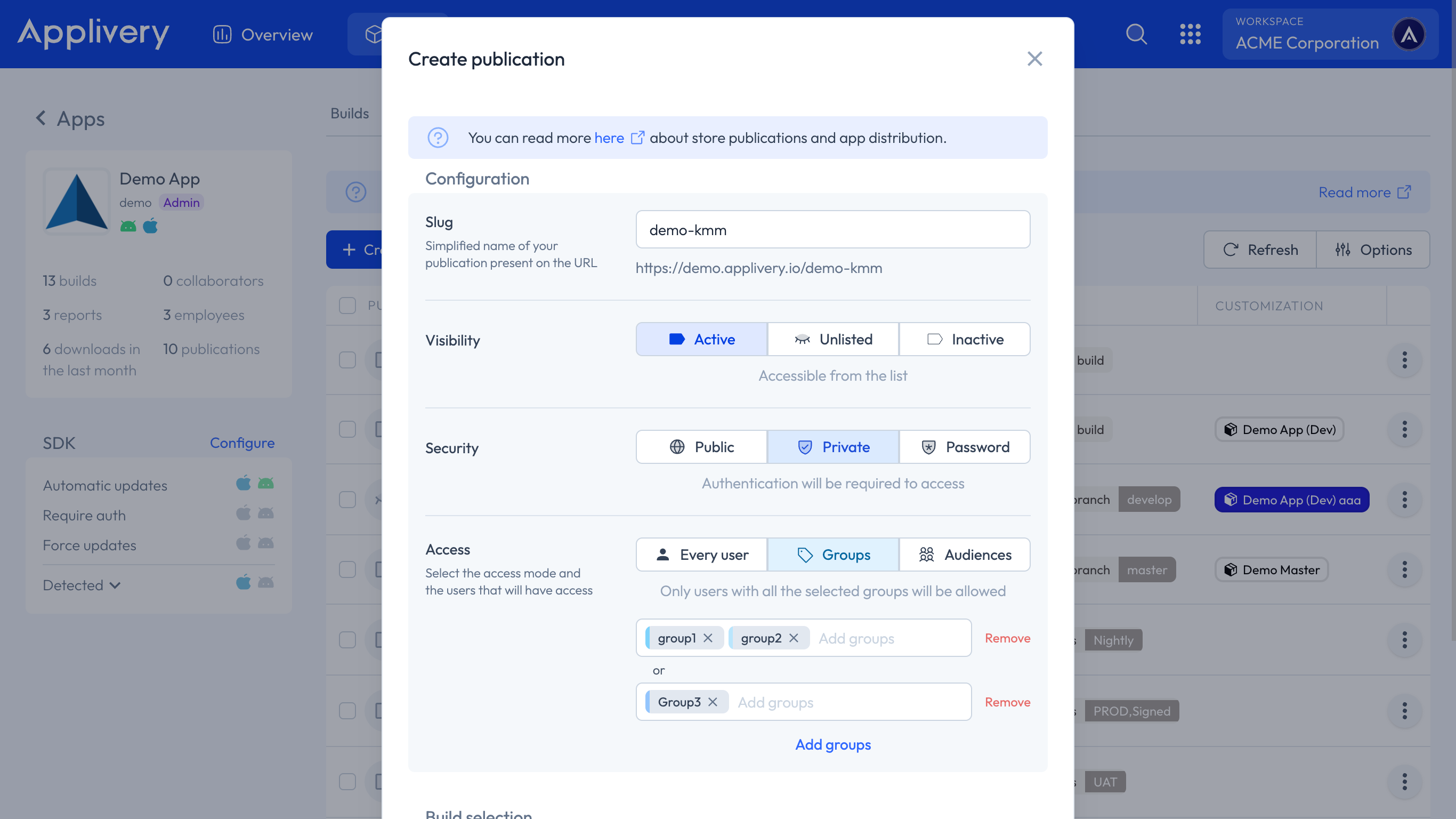
Configuring Group-Based Access
You can add as many groups as needed and combine them using AND and OR logic:
Groups on the same line are treated as
AND: The user must belong to all of them.Each new line is treated as
OR: The user must satisfy at least one of the lines.
Example
To grant access to users who belong to both groupOne and groupTwo, or to users who belong to groupThree:
groupOne, groupTwo
groupThree
This reads as: (groupOne AND groupTwo) OR (groupThree).
A user in groupOne alone would not have access. A user in groupThree alone would have access. A user in both groupOne and groupTwo would have access.
Single Sign-On Group Sync (LDAP and SAML)
When your App Store is connected to an SSO provider — via LDAP or SAML — Applivery automatically captures and syncs User Group membership from your User Directory, including groups defined as Organisational Units (OUs).
How Syncing Works
Group synchronisation happens every time a user logs in. At that point, Applivery reads the user's current group memberships from your directory and updates them in the platform.
To distinguish SSO-sourced groups from groups created directly in Applivery, synced groups are automatically prefixed:
| Source | Prefix | Example |
|---|---|---|
| LDAP | ldap: |
ldap:engineering, ldap:qa-team |
| SAML | saml: |
saml:developers, saml:beta-testers |
| Applivery (native) | (none) | groupOne, groupThree |
This makes it straightforward to use SSO groups in your access rules alongside native Applivery groups — simply reference them with their prefix, for example:
saml:qa-team, saml:mobile-testers
ldap:contractors
Important behaviour
Group sync is login-triggered. All group memberships for a user are overwritten on every new login based on the current state of your User Directory. If you add or remove a user from a group in your directory, the change will not be reflected in Applivery until that user logs in to your App Store again.
This means:
Removing a user from a group in your directory does not immediately revoke their access in Applivery.
Adding a user to a new group in your directory does not immediately grant them access in Applivery.
In both cases, the change takes effect on the user's next login.
Best Practices
Use SSO-prefixed groups (
ldap:/saml:) for access rules that should stay in sync with your corporate directory automatically.Use native Applivery groups for distribution rules that are managed independently from your directory — such as internal beta testers or project-specific access.
When revoking access, keep in mind the login-triggered sync behaviour — if immediate revocation is critical, remove the user account from Applivery directly in addition to updating your directory.
Taking longer than usual. Trying again shortly (attempt 8)