
Favicon

You are here: Home > Device Management > Android > Policies > Prevent Data Transfer

Preventing Data Transfer Between Work and Personal Profiles

Prevent data transfer between work and personal Profiles on Android Devices — configure cross-profile restrictions using Applivery MDM Policies.

5 min read

TL;DR

Prevent data leakage between work and personal profiles on Android devices by configuring cross-profile restrictions in Applivery.

Warning

Cross-profile restrictions require a Work Profile (COPE or BYOD enrollment) and are not available on AOSP Devices. On AOSP, the Applivery DPC runs as Device Owner across the entire Device — there is no personal profile to separate data from.

Protecting corporate data privacy is essential to ensuring the security and integrity of your organization. With the adoption of COPE (Corporate-Owned, Personally Enabled) and BYOD (Bring Your Own Device) enrollment methods, businesses and employees gain flexibility—but also face new security challenges. To reduce risk, it’s important to establish a clear boundary between the personal and work profiles on Android Devices.

With Applivery, you can prevent information from being transferred between profiles, including disabling common system functions like Copy/Paste across work and personal environments.

How to configure cross-profile restrictions

1
Navigate to Policies

Once in the Applivery Dashboard, navigate to Policies 1.

2
Select Android Policy

Select the Android Policy where you want to apply the restriction. Then, go to the Compliance 2 section in the left-hand menu.

3
Configure Cross Profile Policies

Locate the Cross Profile Policies 3 settings. There, you will find the following options:

  • Cross Profile Copy Paste: Select Copy from Work to Personal Disallowed to block copy/paste actions between the work and personal profiles.

  • Cross Profile Data Sharing: Select Data Sharing from Work to Personal Disallowed to prevent data from being shared between Apps across profiles.

  • Show Work Contacts in Personal Profile: Disable this option if you want to hide work contacts from appearing in the personal profile’s contact list.
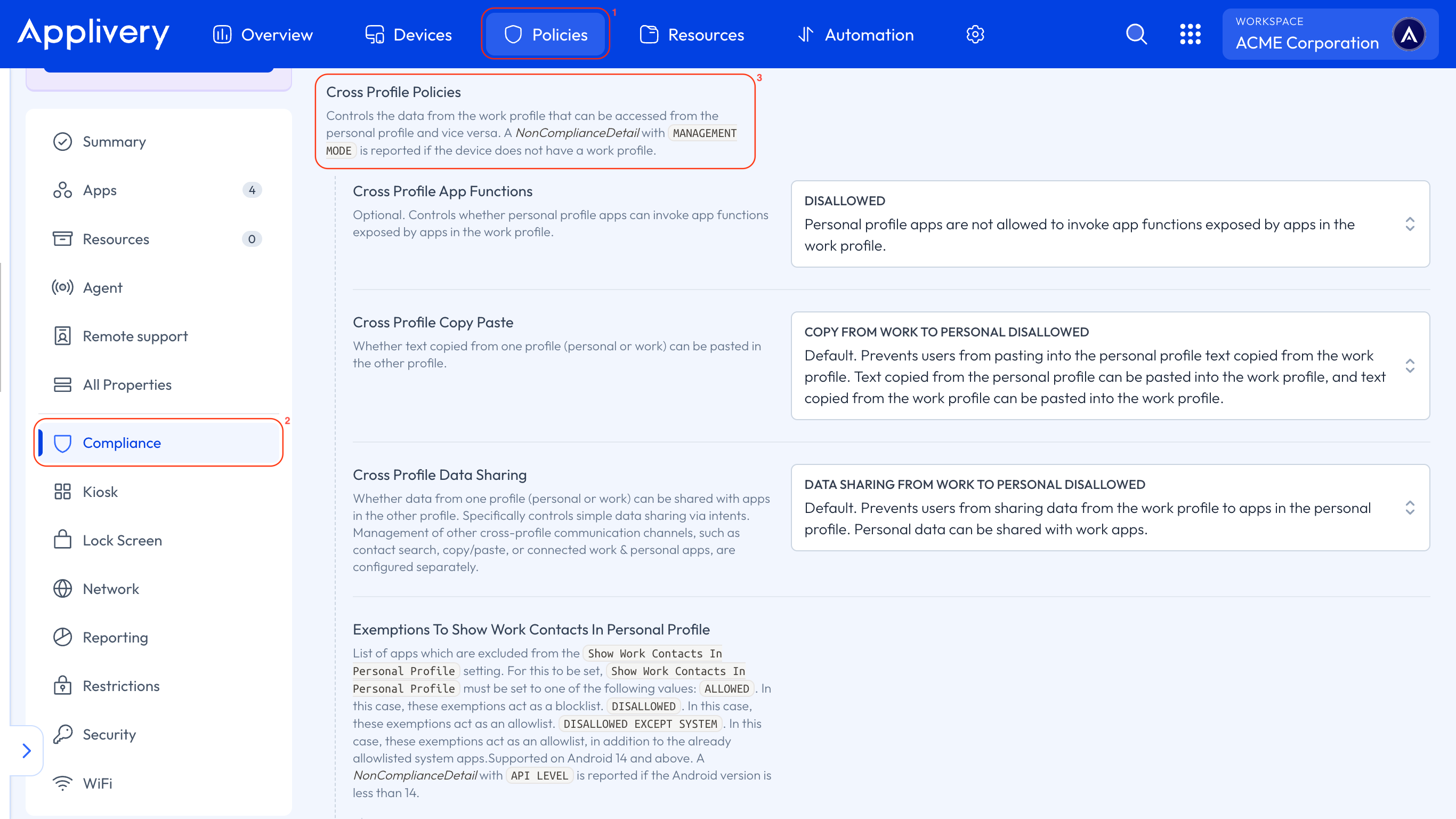
cross profile polices

Applying these Policies will help ensure corporate data remains within the managed environment, reinforcing the separation between work and personal use on Android Devices.

Key Takeaways

  • Cross-profile restrictions are crucial for securing corporate data on Android devices.
  • Applivery provides tools to configure and enforce these restrictions.
  • Blocking copy/paste and data sharing between profiles prevents data leakage.
  • Hiding work contacts in the personal profile enhances privacy.

They prevent data transfer between work and personal profiles on Android devices, enhancing corporate data privacy and security by maintaining data separation.

These restrictions require a Work Profile, supported on COPE or BYOD enrolled Android devices. They are not available on AOSP devices.

On AOSP, the Applivery DPC runs as Device Owner across the entire device, meaning there is no separate personal profile to apply restrictions to.

Navigate to Policies in the Applivery Dashboard, select your Android Policy, go to Compliance, and then configure the "Cross Profile Policies" settings.

Applivery can restrict copy/paste actions, general data sharing between apps, and prevent work contacts from appearing in the personal profile's contact list.

Yes, within "Cross Profile Policies," select "Copy from Work to Personal Disallowed" under "Cross Profile Copy Paste" to block this action.

They create a clear boundary between work and personal data, ensuring corporate information remains within the managed environment and reducing security risks on COPE/BYOD devices.

Last updated: May 25, 2026