

The Applivery Auth Connector is a helper service that supplies your Applivery Workspace with valid SCEP challenge passwords, which are then delivered to Devices so they can request certificates. This is typically required when NDES Certificate Authority services are hosted within private networks.
Applivery distributes the Auth Connector as a Docker container for both AMD64 and ARM64 architectures.
From an infrastructure perspective, the Auth Connector establishes outbound connections to the PKI server running the NDES service, retrieves SCEP challenges, and reports them back to the Applivery Dashboard for use in device configurations.
Before deploying the Auth Connector, you will need to configure a new Certificate Provider.
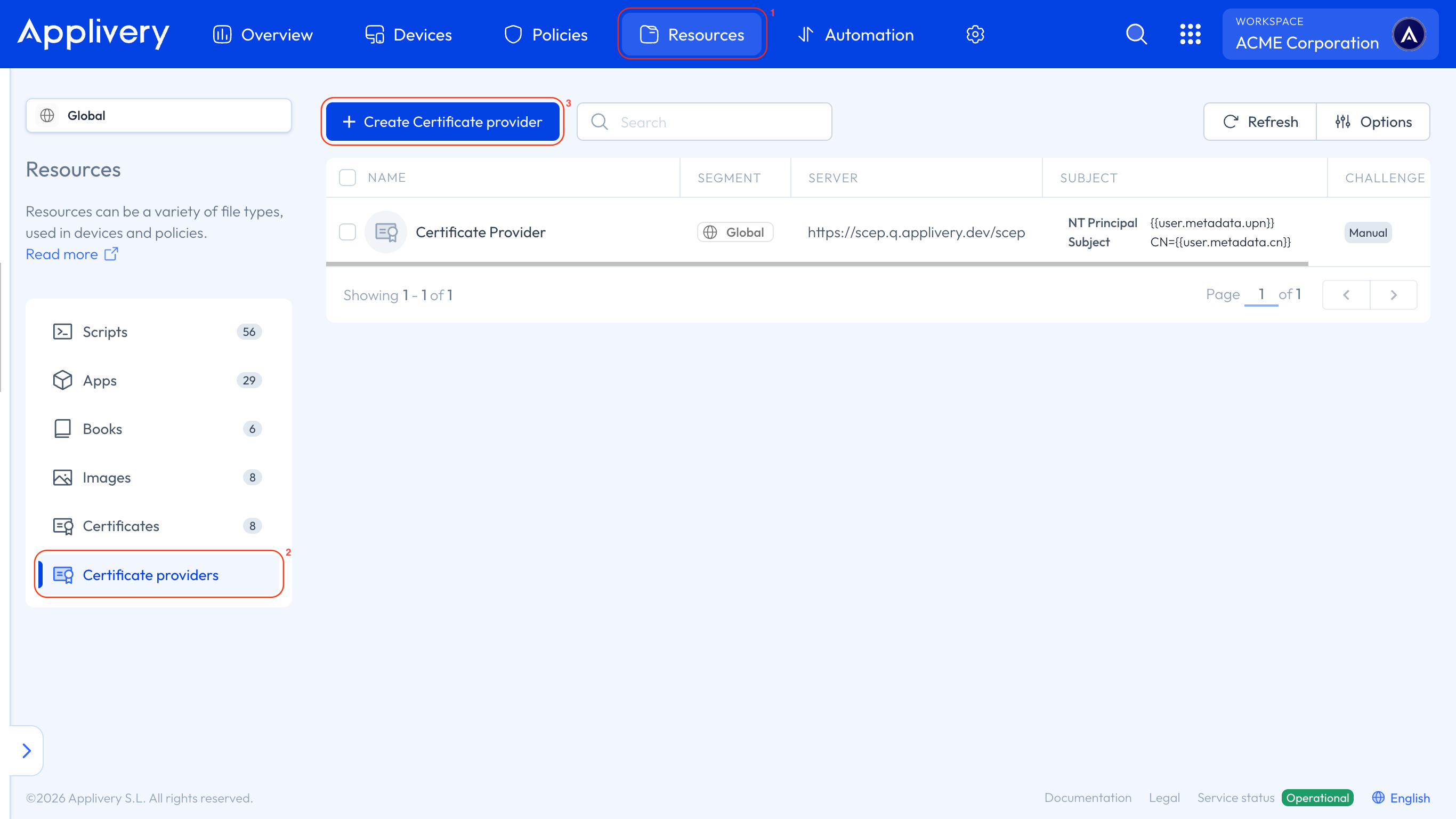
Once in the Applivery Dashboard, navigate to the Resources 1 section. From the left side menu, select Certificate providers 2 and click the + Create Certificate provider button 3.
Fill in the provider's General, Server and Challenge Configuration, and at least one Certificate Profile with its authority name, key and subject. You'll find every field explained in Certificate Providers.
One Auth Connector, one Connector Token and one challenge serve every Certificate Profile on that provider. You don't deploy a connector per profile.
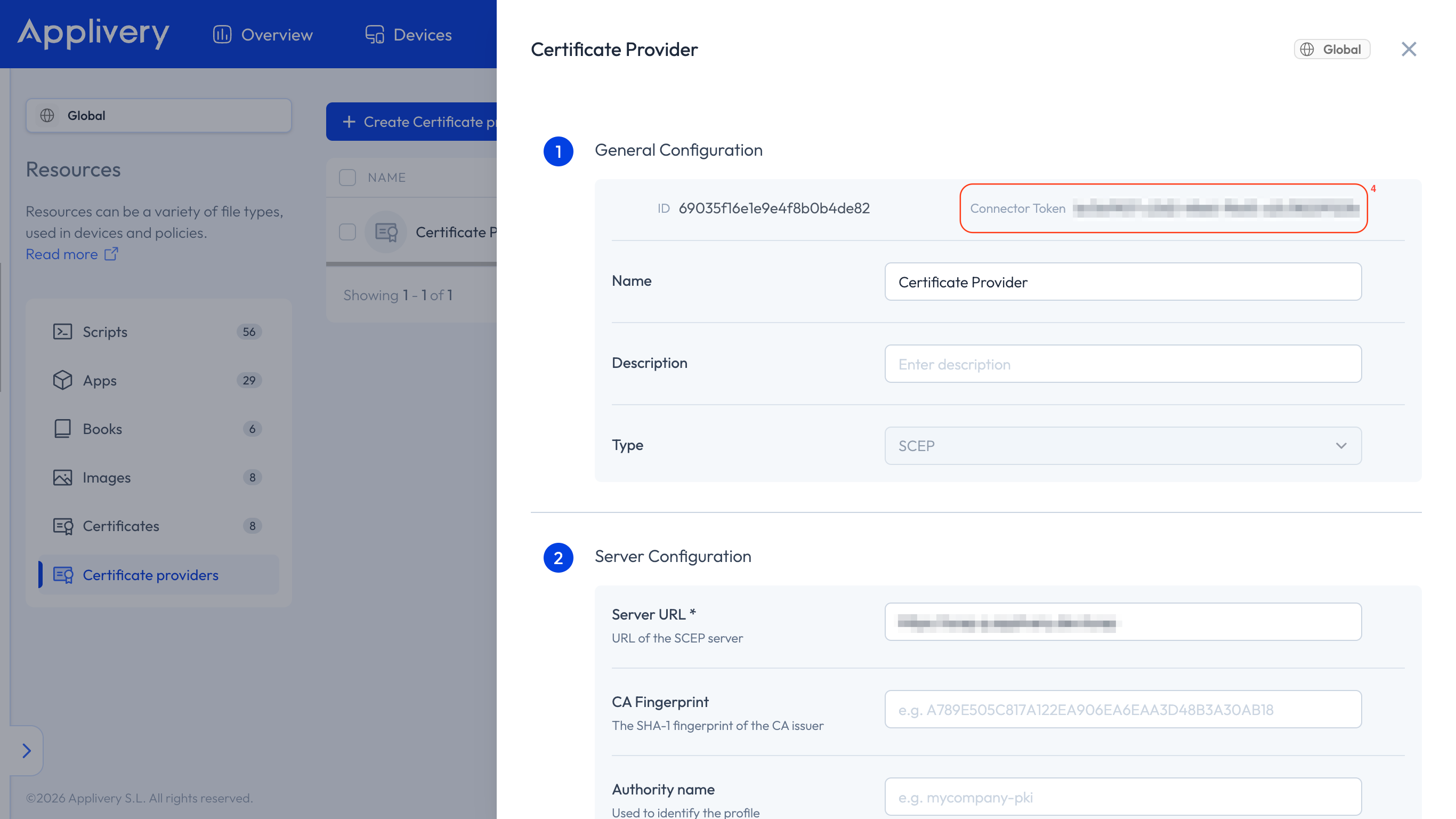
Click Save, then reopen the configuration to copy the Connector Token 4 displayed at the top.
Deploy the Auth Connector as a Docker container.
The service is packaged as a Docker image, which you can download from the Applivery Docker registry:
europe-southwest1-docker.pkg.dev/applivery/public/auth-connector
Available versions
Architecture | Tags |
|---|---|
linux/amd64 |
|
linux/arm64 |
|
How to configure the container
You need to provide a few important pieces of information for the container to run:
CONNECTOR_TOKEN: The token obtained from the Certificate Provider in the previous step.
LOG_LEVEL: The level of logging detail. Options are
debug,info,error, orsilent. Default isinfo.LOG_JSON: Set to
trueto output logs in JSON format, orfalsefor plain text logs. Default isfalse.
You can provide these settings in two ways:
Using a
.envfile: A file that contains all the environment variables.Directly as environment variables in your Docker run command or Docker Compose file.
Configuration file example
# Connector token of the Certificate provider. (required)
CONNECTOR_TOKEN=

# Required for private instance deployments.
# TENANT=

# Log level can be debug, info, error or silent. (default: info)
LOG_LEVEL=info

# Log as json. (default: false)
LOG_JSON=false

# Listening port for the report server. (default: 3000)
PORT=3000
You only need to set the TENANT variable for Private Instances.
Examples with Docker run
# Environment variables
docker run \
 -e CONNECTOR_TOKEN=YOUR_AUTH_TOKEN \
 -p 3000:3000 \
 europe-southwest1-docker.pkg.dev/applivery/public/auth-connector:latest
# Config file
docker run \
 -v .env:/app/.env \
 -p 3000:3000 \
 europe-southwest1-docker.pkg.dev/applivery/public/auth-connector:latest
Examples with Docker Compose
services:
  # Config file
  applivery-auth-connector:
    image: europe-southwest1-docker.pkg.dev/applivery/public/auth-connector:latest
    volumes:
      - .env:/app/.env
    ports:
      - 3000:3000
services:
  applivery-auth-connector:
    image: europe-southwest1-docker.pkg.dev/applivery/public/auth-connector:latest-arm
    environment:
      CONNECTOR_TOKEN: YOUR_AUTH_TOKEN
      #TENANT:
      LOG_LEVEL: info
    ports:
      - 3000:3000
Status report
An HTTP service runs on port 3000 inside the Auth Connector container, exposing a status report with information such as:
Number of challenges requested.
Total error count.
Additional operational metrics.
The same status information is also available directly in the Certificate Provider configuration in the Applivery Dashboard via the connector status icon.
A green checkmark indicates that the connector has reported successfully within the last 20 minutes.
Errors such as The password cache is full indicate that the NDES server has reached its request limit. Adjust the corresponding Windows Server registry values to increase this limit.